Two colleagues working through a setup together on a laptop at a meeting table

CLIENT ONBOARDING

Live in steps, not leaps.

Your business goes live one verified step at a time. Then Connect onboards your own new clients the same careful way.

  • Nothing switched on without you
  • Each channel verified before use
  • Client onboarding recorded step by step

YOUR ONBOARDING

How a business goes live

  1. 1Day 1

    Explore

    Ask the Assistant and build a simulated office.

  2. 2Day 1

    Sign in

    Create your workspace with Google sign-in.

  3. 3Week 1

    Teach and connect

    Add knowledge, then connect and verify your channels.

  4. 4Week 1

    Draft only

    Read what Connect would say before it says anything.

  5. 5Week 2 on

    Widen the rules

    Move channels to review or auto, one at a time.

Timings are typical, not promised. Each step waits until you are ready.

WHY IT HELPS

Confidence before autonomy

See it before it acts

A simulated office shows the shape of the work first.

Verified channels

A mailbox, number or WhatsApp line is used only once it is verified.

Draft-first start

Read what Connect would say before anything is sent.

Clients onboarded too

Won deals open an onboarding record with reasoned follow-ups.

SEE IT
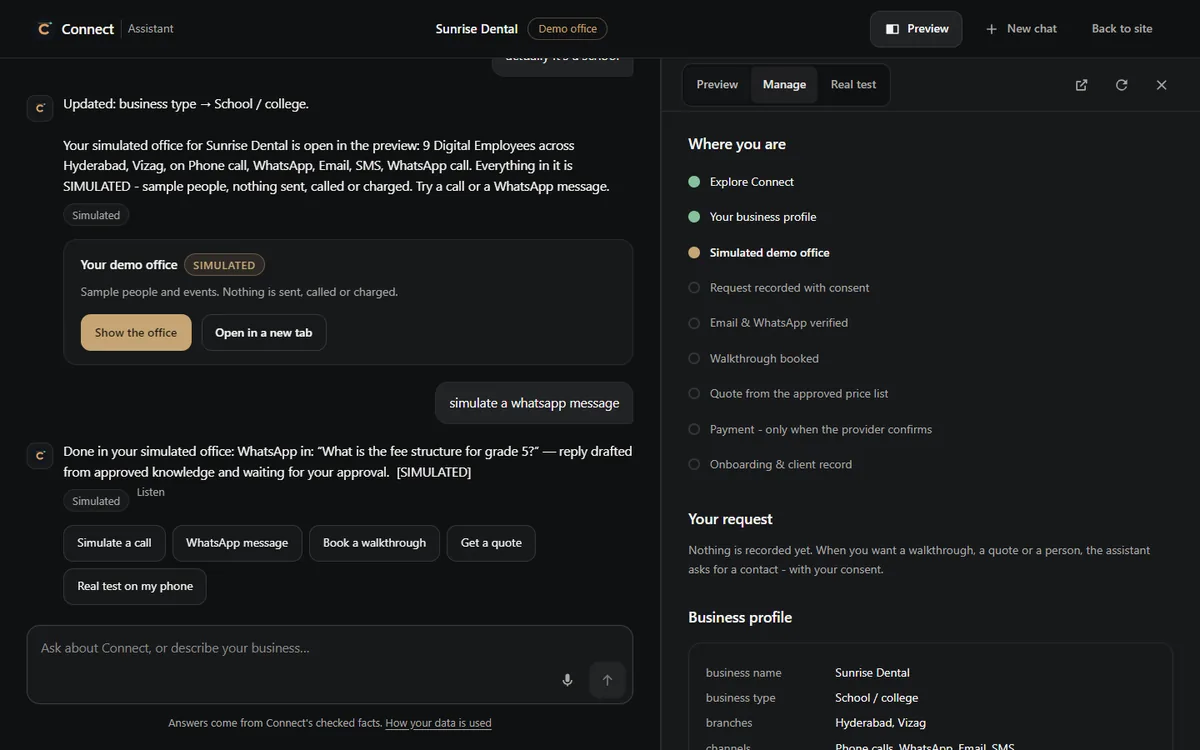
The journey, step by step

The Connect Assistant's Manage tab listing each step from exploring Connect to onboarding, with the current step highlighted
The Assistant's journey panel: each step from a first question to onboarding, and which one the visitor has reached.

YOUR CLIENTS

Onboarding your own customers

When a deal is won, an onboarding record opens on the client's relationship.

  • Steps waiting on the client are chased with a reason
  • Questions are answered from approved knowledge
  • Decisions stop in Needs You

One client onboarding

  • OpensWhen the deal is won or payment is verified
  • StepsWritten for your business, not a fixed template
  • ChasingFollow-ups on the agreed channel
  • DoneMarked by evidence, not by tone
  • ThenThe client becomes active and support continues

USE CASE

A new client's first fortnight

  1. Payment verified

    Onboarding opens on the client's record.

  2. Welcome sent

    Next steps and what is needed from them.

    email
  3. Document chased

    A missing form gets a reasoned follow-up.

    whatsapp
  4. Kick-off call

    Booked from your hours.

    phone
  5. Active

    All steps done; support takes over.

CONTROLS AND LIMITS

Careful by design

Always

  • Channels verified before Connect uses them
  • Staffing previewed, never bought automatically
  • Onboarding steps completed on evidence

Never

  • Connect accounts or buy numbers on your behalf
  • Mark a step done because a message sounded positive
  • Agree commercial terms your knowledge does not support

WORKS WITH

Onboarding, connected

QUESTIONS

Onboarding FAQ

How long does it take to go live?

It depends on your channels and knowledge. Many steps take minutes; verification can take longer.

Is there an onboarding template?

No fixed template. Steps are written for your business.

Can I try before connecting anything?

Yes. The Assistant builds a simulated office, labelled Simulated, with nothing sent or charged.

NEXT STEP

Take the first step today.

Book a walkthrough, or explore with the Assistant first.

  • Step by step
  • Nothing switched on without you
  • Your clients onboarded too